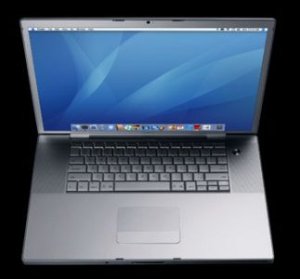
 I bought an Apple Macbook Pro this summer, and I’ve been meaning to post a review for a while, so how does today work for everyone? 😉
I’m a writer, not a techie type, so I won’t go into specifications and hardware and the like. I’m going to hit on the ergonomics perspective. Is this laptop friendly to hands and eyes (and any other body parts you may employ when typing)?
Ergonomics is one of the reasons I’ve been drifting more and more toward Apple products. I have an Ipod (a couple) and an iPhone, and I find them to be a pleasure to work with (ergonomically speaking) compared to other devices I’ve had that perform similar functions. I am impressed with the simplicity and user-friendliness of the iPod and iPhone, and it is a big reason I settled on the MacBook Pro. Also… the laptop is sleek and pretty (hey, I’m a girl–what do you expect?).
So, let’s talk ergonomics (from the viewpoint of someone who has had trouble with RSI over the years).
MacBook Pro Keyboard and Mouse
The keyboard and the mouse are the features of a computer that are most likely to make me complain.
I’ve used keyboards that take way too much force to press down the keys, and it’ll have my hands aching before long (this is my RSI Achilles heel). And on many laptops, where the keyboards are smaller than traditional, I’ll often feel that I have to hold my hands unnaturally in order to type.
I’m pleased to be able to say that the keyboard on the MacBook Pro is a pleasure to type on. Keys respond to a light touch, and even though I got the smaller of the two screen size versions, the keyboard doesn’t feel too small.
I will say that as a long-time Windows user, I do find myself missing the home/end keys a lot. Some of the two-finger keyboard shortcuts I’m used to on Windows keyboards take three on the Mac which feels a bit awkward to me. I’m still learning how to use the MacBook efficiently though, so it may be that I will find better workarounds.
I also like the mouse (touchpad). I’ve hated touchpads in the past (and don’t get me started on those pencil-eraser-looking pointers on earlier laptops), so I’m always ready to glare at that feature on a new laptop.
Initially I thought the button was a bit tough to press on the Macbook Pro touchpad, but I hunted around and found that you can set the touchpad to respond to a tap (my previous experience with the no-longer-made iGesture touchpad made me think of this). So now I just tap the touchpad once to “click” the mouse, and I ignore the button.
The MacBook Pro touchpad also shares some of the other gestures from the old iGesture (I couldn’t tell you whether this is by accident or design). For example, you can sweep a couple fingers across the pad to move forward or back in your browser window. You can also scroll up or down this way.
This is the first laptop I’ve had where I didn’t feel the need to carry an external mouse along to plug in.
One bonus feature that I didn’t know about until I got the laptop home is that the keyboard is light sensitive and illuminates in a dark room. Now, I would never advocate typing in the dark (eyestrain, people!), but if you’ve got to do it (working on an airplane during the night or some such), having the letters on the keys illuminate sure makes it easy. Hey, even touch-typists can lose home row in the dark.
I also dig that the little Apple logo on the case glows in the dark too (no ergonomic function here, but it’s still cool).
MacBook Pro Weight
While I don’t travel as much as many people, I do board planes a couple times a year (hey, a professional blogger needs her vacations!), and I like to take my laptop with me, so weight is always a consideration. This is another of the reasons I was drawn to the MacBook Pro.
I bought the 15 inch display (I avoid larger screened laptops because they’re too hard to open fully and use well on an airplane), and it is 1 inch thick and under 5 and a half pounds. I use a backpack to tote my laptop and related gear around, and I barely notice the weight.
MacBook Pro Display
This is probably my one gripe with the MacBook (and if a techie type reads this and has a solution to fix this for me, I’m all ears!): the default display is 1440 by 900 resolution which makes things small.
I’m used to a 19″ monitor that runs a 1024 x 768 resolution, which is just right for me (alas I don’t have perfect eyes any more). I often find myself hitting the keyboard combo that increases the font size on the screen, which tends to make web pages look funky.
You can, of course, adjust the resolution of the MacBook Pro, but when I tried other settings, the text lost its sharpness and things were noticeably blurry. If anyone has suggestions on how to make the display a little more eye-friendly, I’d love to hear them.
Overall, though, I’m pleased with the MacBook Pro, and when it’s time for me to upgrade my desktop computer, I’ll probably switch to a Mac in that department too.